Local Weather Wherever
- 3.9
- Rating
- 100.00K
- Installs
- Free
- Price

 Analysis by App-foxy
Weather apps often look interchangeable until you use one during a rushed morning, an unexpected shower, or a planned trip. Local Weather Wherever takes a straightforward approach: it is a free weather app from WANWIN LIMITED that brings local forecasts, hourly and daily views, radar information, and storm warnings into one place. I found its appeal less about decoration and more about reducing the number of taps needed to answer a practical question: what should I expect outside today?
The app is available for Everyone and runs on devices using Android 10 or later. Its current version is 1.0, and it has already passed 100 thousand installs. Those details place it in an interesting position: it feels like a relatively new option rather than a long-established weather companion, but there is enough public use to make it worth considering. Its average rating is 3.9 from 229 ratings, which suggests a mixed but generally workable experience rather than universal enthusiasm.
What to expect when you open the app
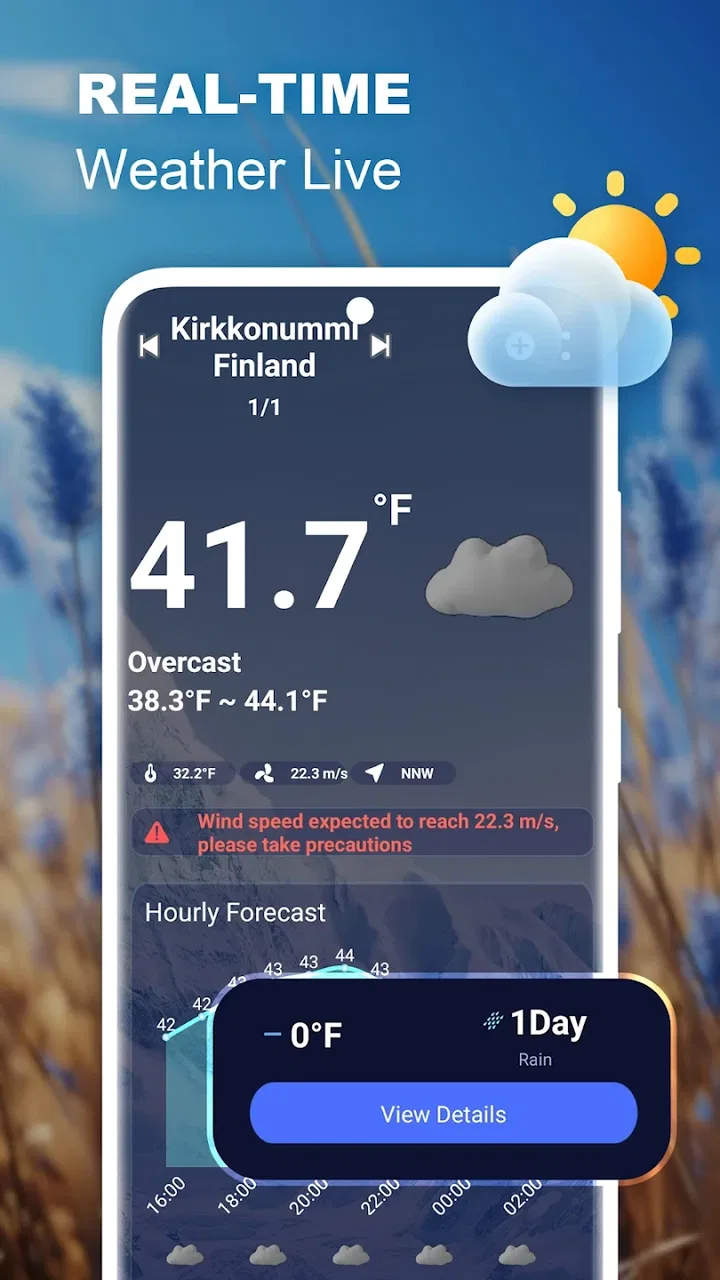
My first impression was that this is designed for people who want weather information without turning the forecast into a project. The central purpose is clear. You can check what is happening now, look ahead by hour or day, inspect radar information, and pay attention to storm warnings when conditions become more serious. That combination covers most ordinary decisions, from choosing clothes to deciding whether an outdoor errand can wait.
You May Also Like

 Blood Strike: 2.5 Anniversary
Blood Strike’s Loadouts Turn Every Drop Into a Tactical Gamble
A close look at Blood Strike’s custom loadouts: how fast access to signature weapons reshapes its battle royale rhythm, rewards preparation, and narrows the gap between fights.

 Pandora - Music & Podcasts
Pandora’s Music Is Easy to Start, but Harder to Recover
Pandora’s strength is its low-effort path from a seed to a station. Its weak spot is how much confidence it asks you to place in connection, setup, and quiet recovery.

 8 Ball Pool
 Is Built on Rivalries, Rematches, and Routine
A close look at the rivalries, rematches, shared routines, and unanswered safety questions that turn a quick pool match into a persistent mobile community.

 Samsung Music
’s Quiet Strength Is Playing What You Already Own
Its reach comes less from spectacle than from dependable access to a personal library. That simplicity is both the app’s strongest retention engine and its ceiling.

 AccuWeather: Weather Radar
AccuWeather Review: A Quick, Clear Forecast for Everyday Decisions
For everyday plans, the best forecast is the one you can understand quickly. AccuWeather makes rain timing, radar, and local conditions easy to act on, with a few trade-offs.

 Hill Climb Racing
Why Hill Climb Racing Still Turns Crashes Into One More Run
A tiny car, a bumpy hill and one more upgrade: Hill Climb Racing keeps resurfacing because its simple chaos makes every near-miss feel personal.
More From Our News Desk
View All News


The most useful distinction is between the different forecast time scales. The hourly view is the one I would use before leaving home, because a day that starts dry may look very different a few hours later. The daily view is better for planning work, school, appointments, or a weekend activity. Radar serves a different purpose altogether: it helps you think about movement and timing rather than simply reading a temperature or a general condition label.
I also appreciate that the app does not present itself as a replacement for every kind of weather service. It is a local forecast tool, not a specialist platform for aviation, marine planning, farming, or emergency response. For everyday users, that narrower purpose is a strength. The interface has a chance to remain understandable because it is focused on the information most people actually check.
There is one important expectation to set before installation. A weather app is only as useful as the location and forecast context it presents. If you travel frequently, compare several places, or need highly specialized information, you may find a broader weather service more suitable. I would treat this app as a convenient daily reference, not as the sole basis for decisions where changing conditions could create serious risk.
Who will get the most from it
I think Local Weather Wherever is a good fit for someone who wants a simple weather check on an Android phone and values having radar and warnings alongside the regular forecast. It also suits people who dislike switching between a forecast screen and a separate radar tool. Parents planning school runs, commuters deciding whether to walk, and anyone arranging outdoor errands can all benefit from that compact setup.
It is less convincing for users who want a heavily customized weather dashboard, deep historical analysis, or specialized environmental readings. The app’s identity is built around local forecasts and immediate awareness. If your ideal weather experience involves extensive graphs, numerous configurable panels, or professional-level detail, the lighter approach may feel limited rather than refreshing.
Setting it up without getting lost
For a first-time user, I recommend beginning with one simple goal: make the app useful for the place where you spend most of your time. Do not start by exploring every view at once. Open the local forecast, identify today’s conditions, and then move to the hourly section. This gives you a quick understanding of how the app organizes information before you investigate radar or warnings.
The first meaningful success should be easy to recognize. You should be able to answer whether the next few hours look suitable for your immediate plan. For example, if I am preparing to walk to a shop, I would check the current condition, scan the hourly forecast for a change, and then glance at radar if rain seems possible. That sequence is more useful than staring at a single daily icon, because it connects the forecast to a real decision.
When you are learning the layout, pay attention to the difference between a forecast summary and a warning. A general daily outlook helps with planning, while a storm warning deserves more attention because it signals that ordinary assumptions may no longer be enough. I would not treat a calm-looking daily summary as permission to ignore a more urgent warning panel.
Another practical habit is to check the app at the same moments each day for a few days. I found that a morning check answers clothing and travel questions, while a later check is more useful for outdoor plans. This routine also helps you understand how much detail you personally need. Some people will be satisfied with the daily view; others will quickly prefer the hourly timeline and radar.
The first successful weather check
Here is the workflow I would suggest to a new user. First, open the local forecast and establish the broad shape of the day. Next, move to the hourly forecast and look for changes around the time you expect to leave or return. Then use radar when precipitation appears likely or when the sky outside does not match the simple forecast summary. Finally, review storm warnings before committing to an outdoor plan during unsettled weather.
This order matters because it prevents a common mistake: using radar as if it were the entire forecast. Radar can help with what is moving nearby, but it does not replace the broader daily outlook. In the same way, a warning should not be buried beneath a quick glance at the current temperature. Combining the views gives a more sensible picture than relying on any single screen.
A realistic example would be a weekday appointment across town. I would check the daily forecast before breakfast, use the hourly view to see whether conditions change during the journey, and look at radar shortly before leaving. If a storm warning appears, I would reconsider the timing or route rather than assuming the earlier forecast still tells the whole story. The app is most helpful when used as a sequence of small checks instead of a one-time prediction.
For a family, the same process can be adapted to school pickup or a park visit. The daily screen can support the initial plan, while the hourly and radar views help decide whether the plan should happen earlier. This is one of the app’s strongest practical qualities: the separate forecast formats are not merely different ways to display the same information. They answer different planning questions.
How radar and warnings change the experience
Radar is the feature I would explore after becoming comfortable with the basic forecast. It adds context that a simple weather symbol cannot provide. Rather than asking only “Will it rain today?”, I can think in terms of whether precipitation appears relevant to my location and schedule. That makes the app more useful for short trips, outdoor chores, and last-minute decisions.
Storm warnings deserve a more cautious approach. I would use them as a prompt to pay closer attention, not as background decoration. If a warning appears while I am planning a walk, cycling trip, or outdoor event, I would check the timing and surrounding forecast information before proceeding. The app can improve awareness, but it cannot make a risky situation safe by itself.
One non-obvious advantage of having radar and warnings in the same weather app is reduced context switching. Many users lose useful information when they jump between several services, especially when they are in a hurry. Keeping the local outlook, near-term forecast, radar, and warning information together makes it easier to compare what the different views are telling me.
Common points of confusion
The first likely confusion is assuming that the daily forecast is precise enough for every decision. It is not the view I would use alone when timing matters. A daily summary can suggest the general character of the day, but the hourly forecast is more appropriate for deciding when to leave home. This distinction is easy to overlook because daily icons are visually simple and tempting to trust.
A second source of confusion is reading radar as a guarantee. I would not interpret a clear radar moment as proof that the entire outing will remain dry. Weather changes, forecast timing can shift, and radar is most useful as part of a broader check. The sensible workflow is to compare it with the hourly view and pay attention to warnings rather than making a decision from one image.
Some users may also wonder whether the app is intended for serious weather monitoring. My answer is no, at least not as a replacement for official emergency communication or specialized services. Its storm-warning feature is valuable for awareness, but I would still follow local authorities during dangerous conditions. That is not a criticism of this particular app; it is a sensible boundary for any general-purpose weather tool.
The relatively modest average rating also tells me to keep expectations realistic. A 3.9 average indicates that the experience will not satisfy everyone equally. Since the app is at version 1.0, I would expect the overall experience to feel like an early release rather than a deeply mature weather platform. That does not make it unusable, but it does make personal testing important. The free price makes that trial easier because there is no purchase decision to make before seeing whether the layout suits you.
Everyday strengths and practical trade-offs
The biggest strength is the way the app brings several useful layers together without changing its basic purpose. Local conditions answer the immediate question, hourly forecasts help with timing, daily forecasts support broader planning, radar adds movement and context, and storm warnings raise the level of attention when needed. I would rather have those tools arranged clearly than a crowded screen filled with information I rarely use.
The main trade-off is depth. A focused weather app may be quicker to understand, but it may not satisfy someone who wants extensive customization or specialist detail. If you compare it with a familiar system weather widget, Local Weather Wherever offers a more deliberate place to inspect radar and warnings. If you compare it with a feature-heavy weather platform, it may feel less comprehensive and less suited to users who want every possible data layer.
Another trade-off is that the app encourages active checking. Its value comes from opening the relevant view when a decision matters. Someone who wants weather information permanently visible on a home screen may prefer a widget-centered alternative. On the other hand, a user who wants to move from a quick forecast to radar without opening several unrelated services may find this approach more convenient.
My most useful tip is to create a personal checking rule rather than trying to monitor everything. For routine days, the daily and hourly views may be enough. For outdoor plans, add radar. For unsettled conditions, include storm warnings in the check. This keeps the app from becoming another source of information overload and makes each feature serve a clear purpose.
When another weather option may be better
I would choose a different app if I needed detailed specialist information, extensive historical comparisons, or a highly personalized dashboard. I would also look elsewhere if my main priority were passive updates through a home-screen widget rather than an app I open for a focused check. Local Weather Wherever is not trying to be every kind of weather product at once, and that limits its appeal for advanced users.
It may also be the wrong choice for someone who wants to make high-consequence decisions from a single consumer forecast. For severe weather, I would combine the app’s warnings with official local alerts and common sense. The app can help me notice changing conditions, but it should not replace emergency guidance, especially when travel or outdoor exposure carries real danger.
For ordinary use, though, the free model changes the calculation. I can install it, try the local forecast, test the hourly view, and see whether radar and warnings fit my routine without committing money. That makes it a reasonable experiment for first-time users who want something more informative than a basic weather glance but less demanding than a professional platform.
My recommendation after using it
After working through the app’s main views, I see Local Weather Wherever as a practical, focused weather companion. It is strongest when I use it to connect forecast information with a specific action: deciding when to leave, whether to carry rain protection, or whether an outdoor plan needs changing. The combination of local forecasts, hourly and daily planning, radar, and storm warnings gives it more everyday value than a simple current-condition display.
I would recommend it to Android users on version 10 or later who want a free way to check local weather in a compact workflow. I would approach it with reasonable expectations because it is currently at version 1.0 and has a mixed average rating rather than an overwhelming consensus. For a first-time user, the best path is simple: start with today, test the hourly view against a real plan, then add radar and warnings when the situation calls for them.
In the end, Local Weather Wherever succeeds when it helps me make a better small decision quickly. It is not the right tool for every weather enthusiast, and I would not rely on it alone during serious emergencies. But for commuting, errands, school runs, walks, and ordinary outdoor planning, its focused collection of forecast views makes a convincing case. If that is the kind of weather information you actually need, the free download is worth trying.
FAQs for Local Weather Wherever
01What features does Local Weather Wherever offer?
Local Weather Wherever provides real-time weather updates, hourly forecasts, and a 7-day outlook. It includes detailed information such as temperature, humidity, wind speed, and UV index. The app also offers severe weather alerts and radar maps to help you stay informed about changing weather conditions in your area.
02Is Local Weather Wherever available for both Android and iOS devices?
Yes, Local Weather Wherever is available for download on both Android and iOS platforms. You can find it on the Google Play Store for Android devices and the Apple App Store for iOS devices. It is designed to provide a seamless experience across different operating systems.
03Does Local Weather Wherever require an internet connection to function?
Local Weather Wherever requires an internet connection to fetch the most up-to-date weather data. However, it can store recent weather data temporarily for offline access. For the most accurate and current information, it's recommended to have a stable internet connection while using the app.
04Are there any in-app purchases or ads in Local Weather Wherever?
Local Weather Wherever is free to download and use, but it does contain ads. There are optional in-app purchases available to remove ads and unlock additional features like advanced radar maps and extended forecasts. This allows users to customize their experience based on their preferences.
05How accurate is the weather information provided by Local Weather Wherever?
Local Weather Wherever sources its data from reliable meteorological organizations to ensure high accuracy. While no weather app can guarantee 100% precision due to the unpredictable nature of weather, this app aims to provide highly reliable forecasts with frequent updates and alerts for sudden changes.
Pros
- Accurate and up-to-date forecasts.
- Customizable alerts for severe weather.
- User-friendly interface.
- Wide range of weather data available.
- Minimal data usage on mobile.
Cons
- Limited offline functionality.
- Ads can be somewhat intrusive.
- Some features require in-app purchases.
- Occasional location detection issues.
- Slow loading times for radar maps.

Local Weather Wherever
Gallery